Adhan Clock By Mumin
A downloadable project
Smart Adhan Clock
Prayer. Time. Beautifully connected.
The Smart Adhan Clock by Mumin Amir brings prayer times, Adhan, Islamic reminders, and modern smart-home convenience together in one beautifully designed device.
Created for the home, the Smart Adhan Clock automatically keeps track of daily Salah, displays the next prayer at a glance, plays your chosen Adhan, and gives you complete control over its appearance, audio, schedule, and reminders — all from your phone.
No complicated setup. No monthly subscription. No account required.
Simply set it up once and let it become part of your daily routine.
Everything You Need, At a Glance
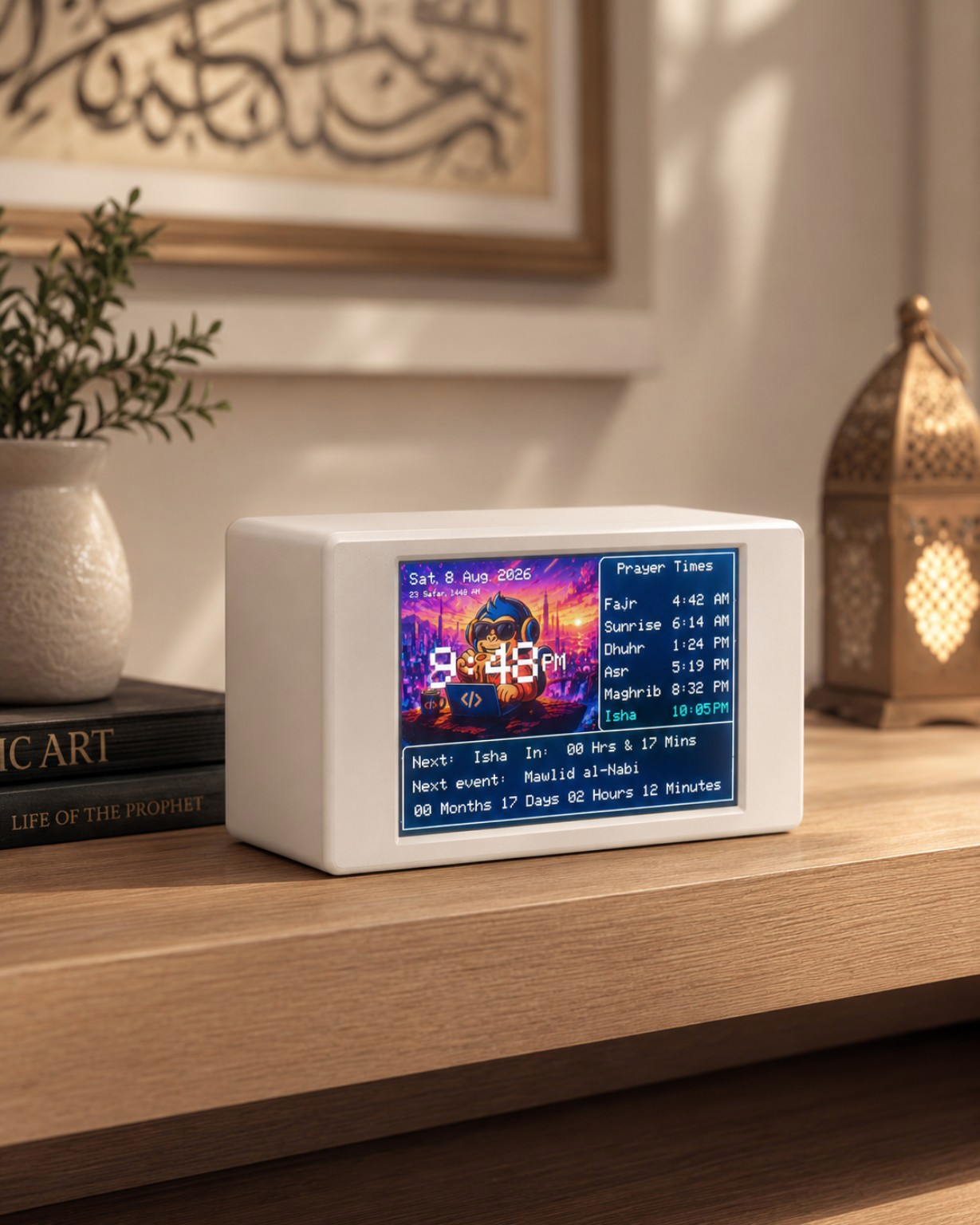
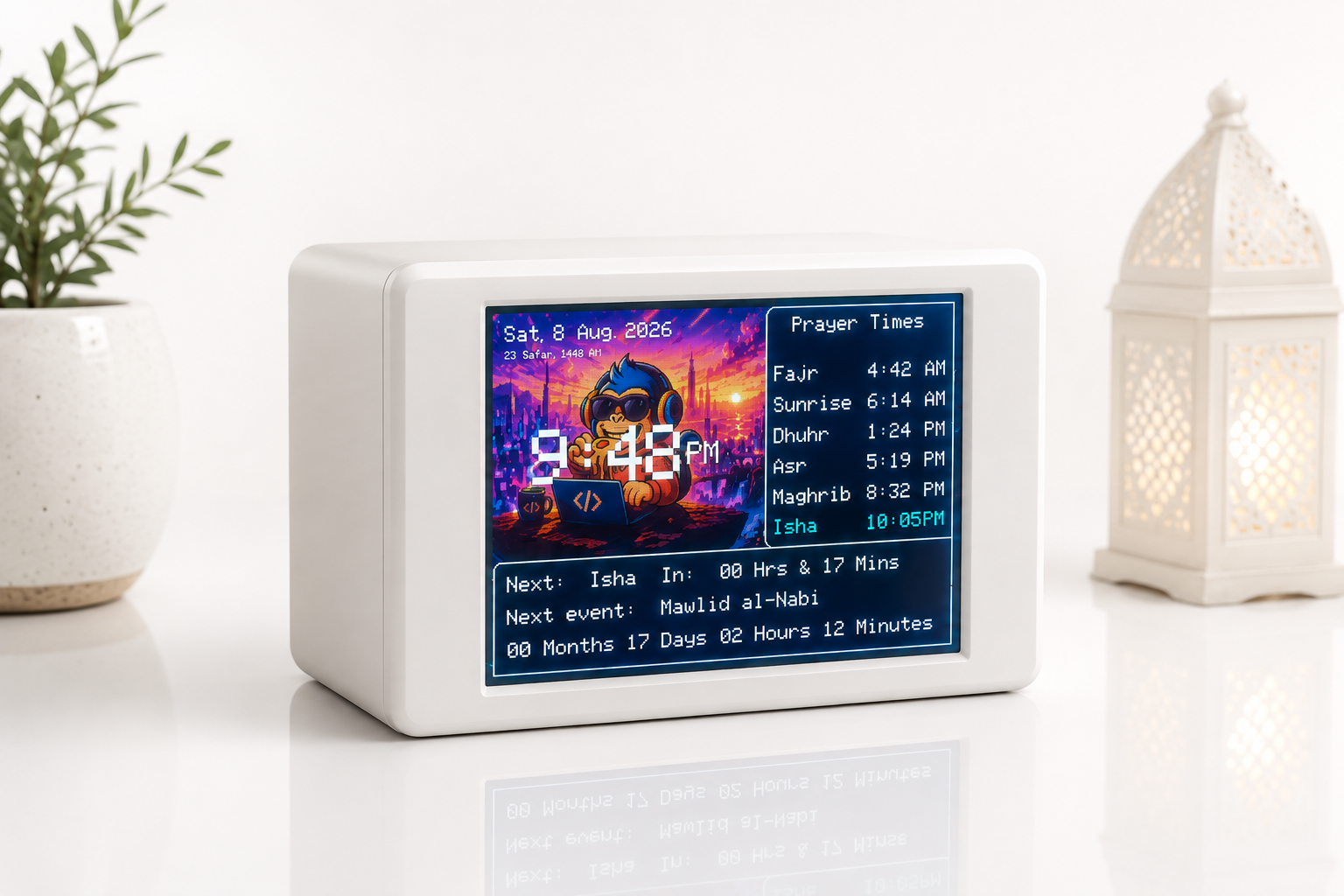
The bright 3.5-inch full-colour display gives you the information that matters without clutter.
See:
- Current time
- Current date
- Daily prayer times
- Next Salah
- Live countdown until the next prayer
- Sunrise time
- Special Islamic dates and reminders
The interface is designed to remain easy to read from across the room while still looking clean and modern in your home.
Automatic Prayer Times
Your prayer schedule is calculated automatically based on your location and selected calculation method.
Prayer times include:
- Fajr
- Dhuhr
- Asr
- Maghrib
- Isha
- Sunrise
The Smart Adhan Clock continually identifies the upcoming prayer and displays a live countdown, so you always know what is coming next.
Multiple Prayer Calculation Methods
Different regions and communities may follow different calculation standards.
The Smart Adhan Clock supports several widely used methods, including:
- Islamic Society of North America
- Muslim World League
- Umm al-Qura, Makkah
- Egyptian General Authority
- University of Islamic Sciences, Karachi
Choose the method appropriate for your location and community directly from settings.
Made for Homes Around the World
With 68 built-in location presets and 65 timezone options, the Smart Adhan Clock is designed for use across a wide range of countries and regions.
It supports locations throughout:
- Canada
- United States
- Europe
- Middle East
- South Asia
- East Asia
- Australia
- New Zealand
- And more
Automatic daylight-saving support is also available for supported locations.
Your Adhan, Your Choice
Why should every prayer clock sound exactly the same?
The Smart Adhan Clock lets you personalize the Adhan experience to your home.
Upload your own compatible Adhan recordings and choose exactly what you want to hear.
You can use:
- One default Adhan for every prayer
- A dedicated Fajr Adhan
- A different Adhan for Dhuhr
- A different Adhan for Asr
- A different Adhan for Maghrib
- A different Adhan for Isha
Supported audio includes MP3 and WAV files.
You can even preview your selected Adhan directly from the control panel.
Dua After Adhan
Continue the reminder beyond the Adhan itself.
The Smart Adhan Clock can automatically play a selected Dua after the Adhan, giving you a more complete and meaningful prayer reminder experience.
Prefer only the Adhan?
Simply turn the feature off.
Tahajjud Reminders
The Smart Adhan Clock can also help you wake for Tahajjud.
Choose your preferred reminder sound and select how long before Fajr you would like to be reminded.
Whether you want a reminder shortly before Fajr or earlier during the night, the schedule can be adjusted to suit your routine.
Intelligent Night Mode
Your home should not feel like a billboard at 3 AM.
The Smart Adhan Clock includes separate day and night behaviour.
Customize:
- Daytime brightness
- Night brightness
- Night-mode start time
- Night-mode end time
- Regular volume
- Night volume
- Night silent mode
Once configured, the clock automatically transitions between your daytime and nighttime settings.
Bright and visible during the day.
Soft and unobtrusive at night.
Make It Yours
The Smart Adhan Clock was designed to look at home in your space.
Customize the visual experience with:
- Adjustable screen brightness
- Custom interface colours
- Custom clock colours
- 12-hour or 24-hour time
- Personalized backgrounds
- Day and night display profiles
Upload your own background image and completely change the character of the display.
Supported image formats include:
JPG • JPEG • PNG • BMP • DIB
Whether you prefer minimal, elegant, colourful, Islamic, or something completely personal, the clock can be styled around you.
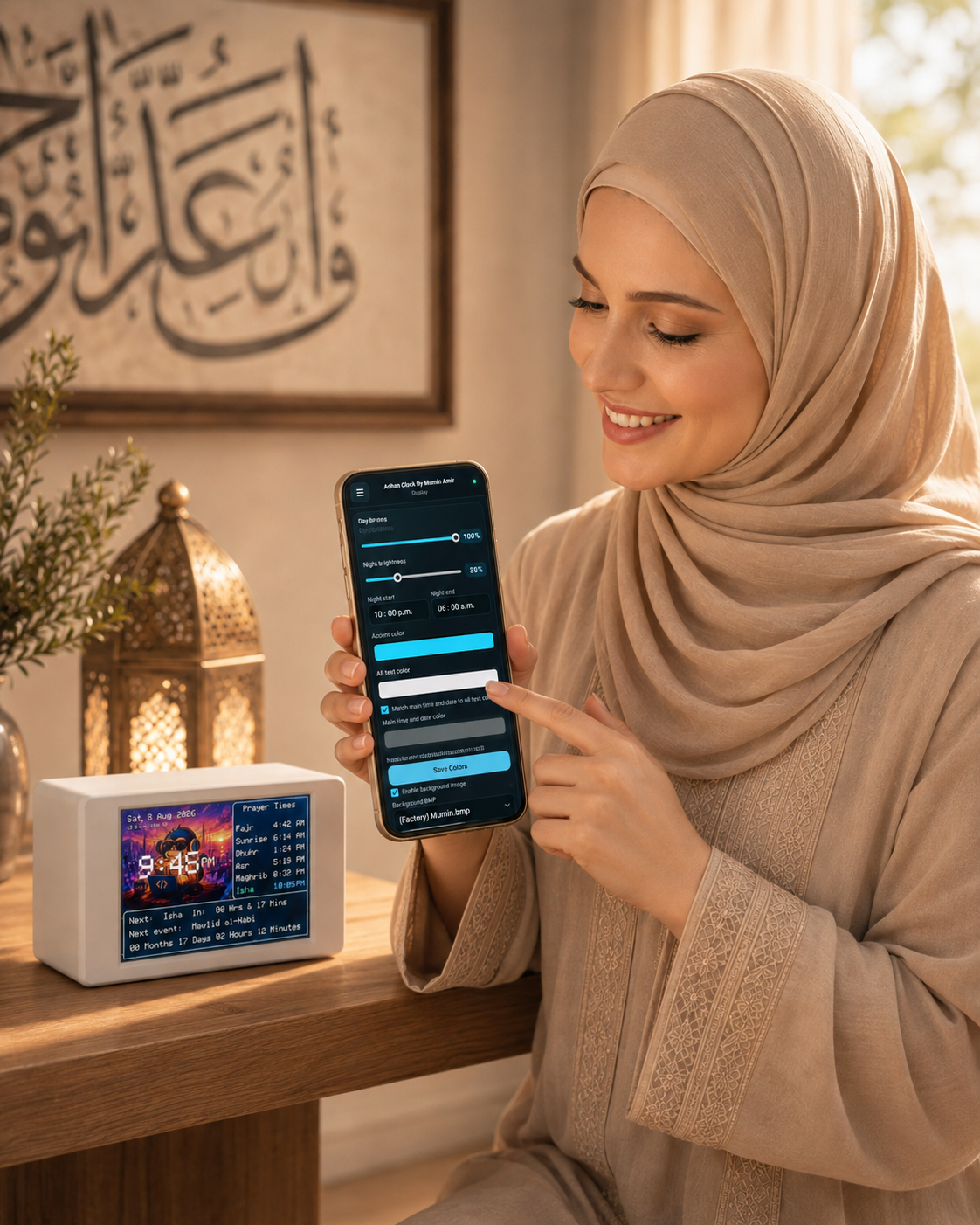
Control Everything From Your Phone
There is no proprietary companion app to download.
The Smart Adhan Clock includes its own built-in control interface that you can access through a regular web browser.
Use your:
- Phone
- Tablet
- Laptop
- Desktop computer
to configure the clock.
The control centre includes dedicated sections for:
Overview
See important clock information and today's prayer schedule.
Time & Location
Configure location, timezone, clock format, and prayer calculation settings.
Display
Adjust brightness, colours, backgrounds, and night mode.
Audio
Manage Adhan files, volume, Dua playback, Tahajjud reminders, and individual prayer audio.
Special Days
Manage important Islamic occasions and personal events.
Files
Upload and organize custom audio and display content.
System
View device information, storage status, clock status, and system controls.
Everything is organized into a clean interface designed to make configuration simple.
No Subscription. No Account. No Cloud Dependency.
The Smart Adhan Clock does not require you to create an account just to use something sitting inside your own home.
There is:
- No monthly subscription
- No mandatory account
- No required mobile app
- No advertising
- No permanent cloud dependency
- No login just to change basic settings
Your clock can be managed directly from devices already in your home.
It is designed to keep doing its job without depending on some distant service staying online forever.
Islamic Special Day Reminders
Important days deserve more than an ordinary date on a calendar.
The Smart Adhan Clock includes support for major Islamic occasions such as:
- Eid al-Fitr
- Eid al-Adha
- Islamic New Year
- Mawlid al-Nabi
- Laylat al-Qadr
- Beginning of Ramadan
Special-day greetings and countdowns can be displayed directly on the clock.
Individual reminders can be enabled or disabled according to your preference.
Add Your Own Important Days
Your family has important dates too.
Create personal events for things such as:
- Birthdays
- Anniversaries
- Family occasions
- Community events
- Personal reminders
Your Smart Adhan Clock becomes more than a prayer display — it becomes part of your household.
Built-In Media Management
Personalizing your clock does not require removing storage cards or repeatedly connecting cables.
Upload compatible content directly through the clock's control panel.
Manage:
- Adhan recordings
- Dua recordings
- Tahajjud audio
- Background images
- Custom media
You can also see how much storage is being used and remove uploaded files you no longer need.
Designed to Protect Your Settings
A device you rely on every day should stay reliable.
The Smart Adhan Clock includes built-in safeguards designed to protect important settings and recover gracefully when something goes wrong.
Its internal protection systems help preserve:
- Prayer configuration
- Location settings
- Display preferences
- Audio selections
- User settings
- Media references
The clock also checks for missing or invalid files and is designed to avoid configuration problems caused by incomplete changes.
Most of this happens quietly in the background.
You simply enjoy a clock that works.
Precision Timekeeping
Accurate prayer reminders begin with accurate time.
The Smart Adhan Clock includes a dedicated precision timekeeping system that continues maintaining the clock even when the main device is powered off.
This helps ensure your daily schedule remains consistent without requiring constant manual correction.
Easy Reset & Recovery
Need to start over?
The Smart Adhan Clock includes dedicated reset options for different situations.
Settings Reset
Restore your configuration without unnecessarily removing everything stored on the clock.
Full Reset
Return the clock to a clean state by removing personal settings and uploaded content while protecting essential system resources.
Confirmation safeguards help prevent accidental resets.
Premium Audio Experience
The built-in digital audio system is designed specifically for clear Adhan playback.
Features include:
- Dedicated full-range speaker
- Digital audio amplification
- Adjustable volume
- Separate night volume
- Individual prayer audio
- MP3 and WAV support
- Adhan preview
- Optional Dua playback
- Tahajjud reminder audio
- Silent mode
The result is a much more flexible experience than a traditional fixed-audio prayer clock.
Product Specifications
Display
3.5-inch full-colour display
480 × 320 resolution
Adjustable day/night brightness
Custom backgrounds and colours
Connectivity
Built-in 2.4 GHz Wi-Fi
Browser-based wireless setup and configuration
No dedicated app required
Audio
High-quality digital audio system
Integrated full-range speaker
Up to approximately 3 W audio output
MP3 and WAV playback support
Adjustable daytime and nighttime volume
Storage
Stores custom Adhan audio, backgrounds, Dua audio, reminders, and configuration data
Timekeeping
Dedicated precision real-time clock
Backup time retention
Automatic prayer scheduling
Automatic daylight-saving support for supported regions
Power
USB-C powered
Recommended power supply: 5 V / 2 A
Display Modes
12-hour clock
24-hour clock
Custom day mode
Custom night mode
Automatic brightness scheduling
Prayer Support
Fajr
Sunrise
Dhuhr
Asr
Maghrib
Isha
Live next-prayer countdown
Multiple calculation methods
Individual Adhan selection per prayer
One Clock. Built Around Your Routine.
Traditional Adhan clocks give you a few buttons and expect you to live with whatever was programmed into them.
The Smart Adhan Clock takes a completely different approach.
Change the Adhan.
Change the background.
Change the colours.
Change the brightness.
Change the night schedule.
Change the volume.
Choose your prayer calculation method.
Set up Tahajjud reminders.
Enable Islamic occasion reminders.
Add your own special days.
Manage everything wirelessly from your phone.
And when you're finished customizing it, simply let the Smart Adhan Clock become part of your home.
Smart Adhan Clock — By Mumin Amir
Modern technology built around timeless worship.
Smart Adhan Clock - Build Project
Complete wiring map, hardware assembly, build steps, diagnostics, and sample firmware for the Smart Adhan Clock.
Before you start
- Read the full Build Guide before wiring power.
- The Adhan Clock manual is the user-facing operating manual.
- The sample firmware folder contains the diagnostic/reference firmware used to test the hardware before loading the full clock firmware.
- Keep the display, audio amplifier, storage module, and RTC on the correct power rails. Do not guess between 5 V and 3.3 V.
Main hardware
- ESP32 WROOM-32 development board
- 3.5-inch ILI9488 480 × 320 TFT display
- DS3231 real-time clock module
- MAX98357 / MAX98357A I2S audio amplifier
- 8 Ω full-range speaker
- microSD card and SD card module
- Regulated 5 V / 2 A USB-C power supply
- Electrolytic bulk capacitor, jumper wiring, connectors, and enclosure hardware
1. Build the power system first
The documentation separates the clock into a 5 V / VIN rail, a 3.3 V rail, and a common ground.
5 V / VIN
- TFT VCC
- MAX98357 VIN
- Capacitor positive (+)
3.3 V
- SD/storage module 3V3
- DS3231 positive (+)
- MAX98357 SD / EN
Common ground
Connect ESP32 GND, TFT GND, storage GND, MAX98357 GND, DS3231 negative (-), and the capacitor negative (- / striped side) together.
Important power rules
- Never connect 5 V directly to the ESP32 3V3 pin.
- The capacitor goes in parallel across 5 V and GND, not in series.
- Do not connect the capacitor to the DS3231 coin-cell battery pins.
- The speaker connects only between SPK+ and SPK-. Neither speaker lead goes to GND.
2. Wire the SD storage module
The storage module uses its own SPI bus in the current clock build.
- 3V3 → ESP32 3V3
- GND → ESP32 GND
- CLK → GPIO18
- MOSI → GPIO23
- MISO → GPIO19
- CS → GPIO13
After wiring, use the sample diagnostic firmware to confirm the card can mount, write a file, read the same data back, and delete the test file.
3. Wire the MAX98357 audio amplifier
- VIN → 5 V / VIN
- GND → GND
- BCLK → GPIO26
- LRCLK / LRC → GPIO25
- DIN → GPIO27
- SD / EN → 3.3 V
- SPK+ → speaker positive / red lead
- SPK- → speaker negative / black lead
Start speaker testing at a moderate volume. The sample firmware includes a dedicated audio test so the amplifier and speaker can be verified separately from the full Adhan features.
4. Wire the ILI9488 TFT display
The display is on a separate SPI bus from the storage module.
- VCC → 5 V / VIN
- GND → GND
- SCK / CLK → GPIO14
- SDI / MOSI → GPIO4
- SDO / MISO → not connected
- CS → GPIO32
- DC / RS → GPIO16
- RST → GPIO17
- LED / BL → GPIO33
Run the display test before continuing. A clean full-screen colour/grid test is much easier to debug than diagnosing the display after every other module is already active.
5. Wire the DS3231 RTC
Mini DS3231 boards commonly expose +, -, D, C, and NC.
- + → 3.3 V
- - → GND
- D → GPIO21 (SDA)
- C → GPIO22 (SCL)
- NC → not connected
The clock firmware uses SDA on GPIO21 and SCL on GPIO22. The sample test verifies that the RTC is detected, accepts a time write, reads back correctly, and continues ticking.
6. Run the sample hardware diagnostics
Before flashing the complete clock firmware, use the Sample Firmware. The diagnostic build is designed to isolate hardware problems.
Test in this order:
- Display colour and grid output
- DS3231 detection, write/read, and ticking
- SD card mount, write, read-back, and delete
- MAX98357 speaker playback
If one component fails, fix that hardware path before moving to the full production firmware. This prevents a storage, power, display, or audio fault from looking like a prayer-clock software problem.
7. Install Arduino IDE and ESP32 support
Arduino IDE
Install the current Arduino IDE on your computer.
ESP32 Boards Manager
Add the stable Espressif boards URL in Arduino IDE preferences: https://espressif.github.io/arduino-esp32/package_esp32_index.json
Then install esp32 by Espressif Systems from Boards Manager.
Board and port
Choose ESP32 Dev Module or the closest match for your ESP32 DevKit, then select the COM/serial port belonging to the board.
8. Install the required libraries
The production firmware uses these core libraries/components:
- Arduino_GFX / GFX Library for Arduino
- RTClib
- ArduinoJson
- ESP8266Audio
- ESPAsyncWebServer
- AsyncTCP
The ESP32 board package also supplies WiFi, DNSServer, SPI, SD, Wire, Preferences, FreeRTOS support, and the ESP32 runtime headers used by the project.
9. Prepare the microSD card
Use a FAT32-formatted microSD card. Formatting erases the card, so back up any factory Adhan/background files first and restore the required folder contents afterward.
Keep the storage card inserted while testing the full firmware because audio, background media, and persistent files depend on it.
10. Open and compile the firmware
Put the .ino file inside an Arduino sketch folder with the same sketch name. Open it in Arduino IDE and click Verify first.
If the sketch is too large for the default partition layout, use a larger application partition option such as No OTA (Large App) when available for your board package.
11. Upload to the ESP32
Connect the ESP32 with a data-capable USB cable and click Upload.
If upload remains stuck on Connecting..., use the board's BOOT/EN sequence and retry at a lower upload speed if necessary.
After a successful upload, the ESP32 should restart automatically.
12. Check Serial Monitor
Open Serial Monitor and use the baud rate configured by the firmware (the current project uses 115200). Watch the startup log for display, RTC, storage, audio, and Wi-Fi status.
Final wiring checklist
- 5 V only goes to the intended 5 V/VIN devices.
- 3.3 V devices and enable pins remain on 3.3 V.
- All grounds are common.
- TFT SDO/MISO is left disconnected in this build.
- Display SPI and storage SPI use their documented GPIOs.
- Speaker is connected between SPK+ and SPK-, never speaker-to-ground.
- RTC SDA/SCL are GPIO21/GPIO22.
- SD write/read testing passes.
- Display test is clean.
- RTC advances normally.
- Speaker test is audible without resets or severe distortion.
Quick troubleshooting
No COM port
Check the USB cable and install the CP210x or CH340/CH341 driver that matches the USB interface chip on your ESP32 board.
Board list is missing
Confirm the Espressif Boards Manager URL was added and esp32 by Espressif Systems is installed.
Program is too large
Choose a larger application partition scheme such as No OTA (Large App) when supported.
ESP32 will not connect during upload
Hold BOOT, tap EN/RESET, and release BOOT when the IDE starts connecting. Also try a lower upload speed and another data-capable USB cable.
Display does not work
Re-check TFT power plus GPIO4, GPIO14, GPIO32, GPIO16, GPIO17, and GPIO33. Confirm TFT SDO/MISO is not connected.
SD fails
Confirm FAT32 formatting, card insertion, module power, and GPIO13/18/19/23. Try another card if write/read verification still fails.
RTC fails
Check DS3231 power and GPIO21/GPIO22. If it repeatedly reports lost power after unplugging, inspect the RTC backup battery.
Audio fails or the clock resets during playback
Check the 5 V supply, common ground, MAX98357 wiring on GPIO25/26/27, speaker wiring, and the bulk capacitor/power path.
Project resources
- Build Guide — complete builder documentation and source notes
- Manual — operating instructions for the finished clock
- Sample Firmware — hardware diagnostic/reference firmware
- Background Template — background artwork template
- Adhan Clock product page
Download

Leave a comment
Log in with itch.io to leave a comment.